

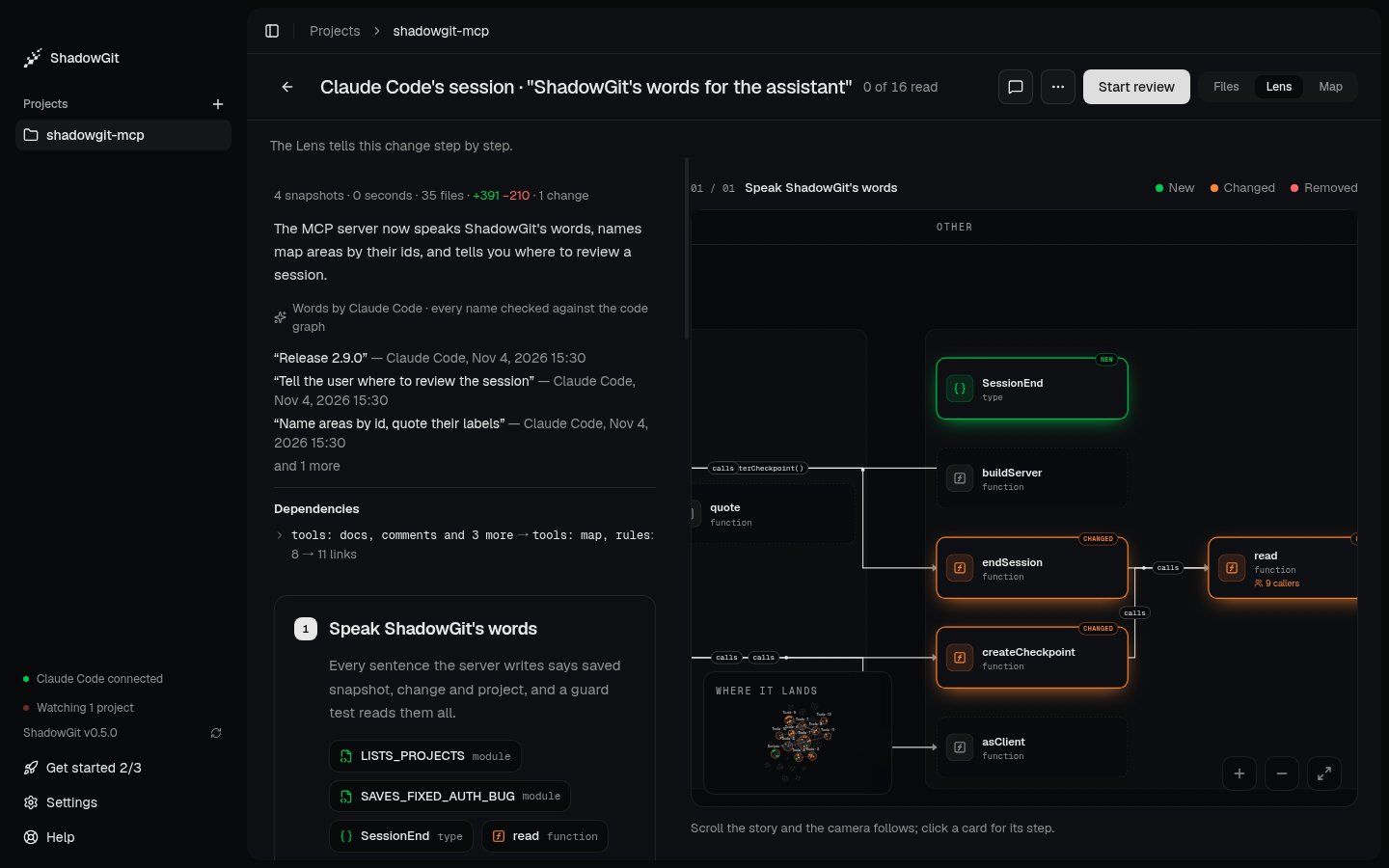
The Lens of Claude Code's session, in the words of the assistant that made the change
Open the Lens
The Lens is one of Review’s three views: open a change, then click Lens at the top right, or pressG then L. It reads the change Review has open, a session, your own changes or two snapshots you compare.
The Lens needs ShadowGit 0.3.6 or later, and is a view in Review from 0.5.0.
New snapshots don’t redraw what you’re reading. When they arrive, Newer snapshots: update appears at the top. Click it to read the change up to the newest snapshot.
Read it
- The top counts the change’s snapshots, files, added and removed lines and changes. Below the counts are a summary, the names of the snapshots saved in the change, the links the change adds that your rules name, and the change’s dependencies.
- Each step says what it adds, changes or removes, in order. Its names link to their cards on the canvas. Also in this step lists the other pieces it touches, and a line like “Reaches 14 symbols in 5 files” says how much code depends on it. Show code opens the step’s code.
- The canvas draws a card for each function, class or type, marked New, Changed or Removed, with arrows for the calls between them. Layers run as captions across the top.
J and K to move to the next and previous step. Where it lands, in the canvas’s corner, opens the change on the Map.
Under each step, Viewed this step’s files marks its files viewed, as in Files. To comment on a step’s code, point at a line and click the + beside its number, or drag across lines. The button that sends your comments is at the top here too, as in Comments.
Calls
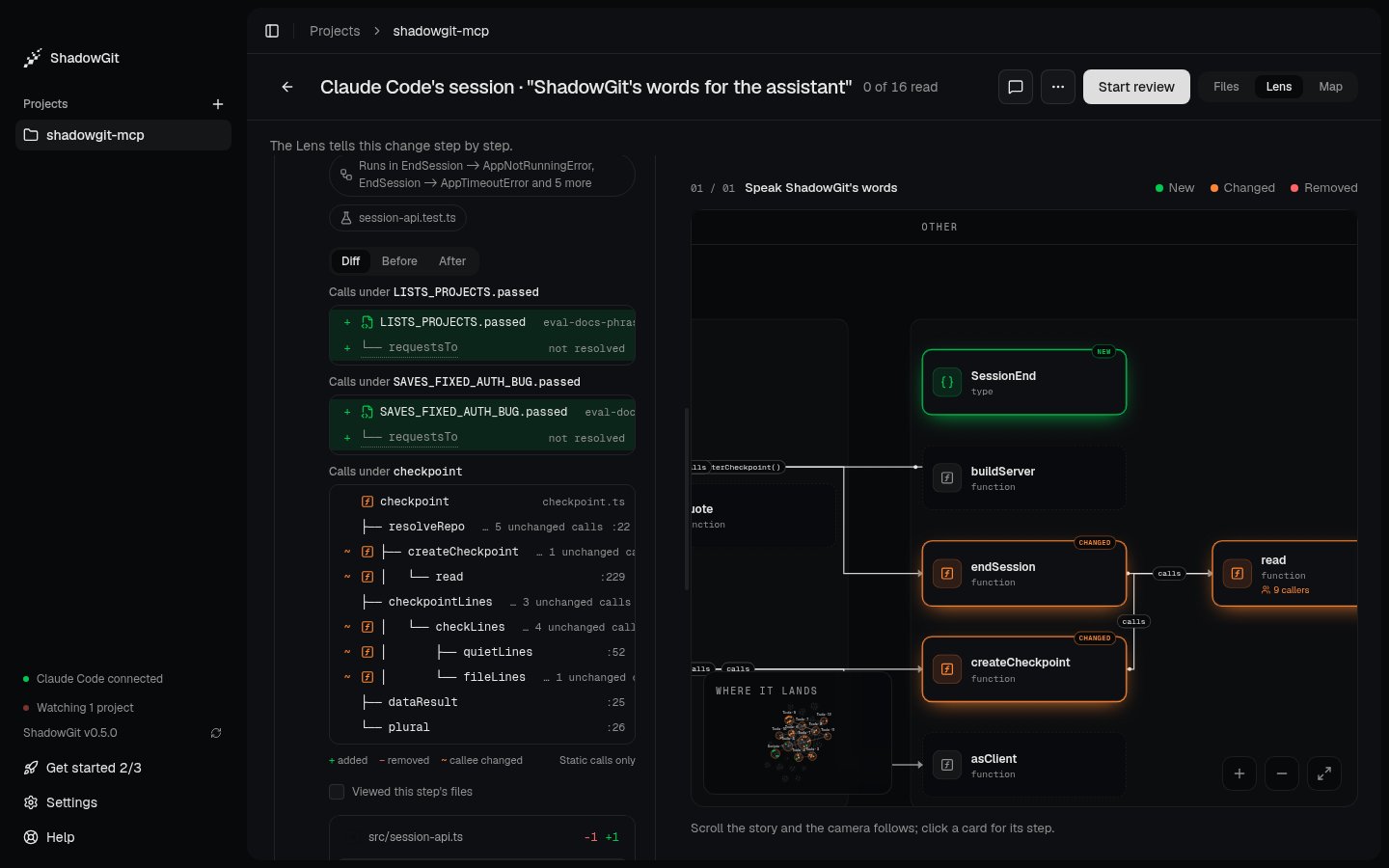
A step's calls: new calls marked with +, and calls to functions the change altered marked with ~
Diff shows both sides. Before and After show the calls as they were and as they are. A row linked to a card on the canvas opens it. The trees hold the calls ShadowGit reads in the code itself (Static calls only), so a call made through a variable, such as a callback, may be missing. A long tree ends with how many more calls it holds. Calls need ShadowGit 0.4.0 or later.
Dependencies
Under the summary, Dependencies says what the change makes depend on what, between your project’s areas (the parts the Map draws) and its layers:
Click a line for the links behind it, such as “retryFailedCharges (src/jobs/retry.ts:5) calls route (src/api/router.ts:4)”. step 2 beside it opens the step that holds it, and that step names the dependency too.
An import makes a dependency, followed through files that only pass names on. Imports of types count, as “imports types from”. Calls,
extends and implements between the two areas count with it, but a call alone, with no import behind it, never makes a line. Test files aren’t counted. Layers count when they’re where your code runs, such as main and renderer, or packages. The lines say what changed. Whether a dependency belongs there is yours to judge.
The Lens lists up to 12 lines, and says how many more there are. Dependencies need ShadowGit 0.3.11 or later.
Words from your assistant
ShadowGit writes the steps from the code on its own. The assistant that made the change can write them instead: a summary, a title and a sentence or two for each step, and the role each piece plays. Your assistant does it at the end of a session without being asked. To ask anyway:.shadowgit.git, on your computer.
What the Lens reads
The Lens reads code in TypeScript, JavaScript, Python, Java, C, C++, C#, Go, Rust, Kotlin, PHP, Ruby and Swift. Other files, such as docs, config and images, show in Files but not in the Lens. A change that touches only those says “Nothing here changes code”, with Show the files to open them. Limits:- A snapshot of more than 20,000 files or 64 MB of source code is too large to draw, and so is a change whose two ends together pass that.
- Source files over 512,000 characters are skipped.
- A step shows the code of up to 12 files. Read the rest in Files.
Troubleshooting
When the Lens can’t draw a change, it says “Couldn’t draw the Lens” and why.”This snapshot has too many files for the code graph” or “This snapshot is too large for the code graph”
The project’s snapshots hold more than 20,000 files or 64 MB of source. Generated code and copied-in dependencies are the usual cause. Add their folders to.shadowgit-ignore (see Leave files out), and the next snapshots leave them out.